Dokładny opis zastosowania przycisku DATA przy wyborze rodzaju modulacji:
The Front Panel DATA Button
When you press the DATA button on the front panel to select LSB-DATA or USB-DATA mode,
you can adjust the TX and RX audio filters specifically for data operation. These settings are
independent of those you would normally use for SSB voice operation.
TX Data Audio Filter: Menus 27 and 28 let you select the lower and upper audio cut-off
frequencies of the transmitted signal.
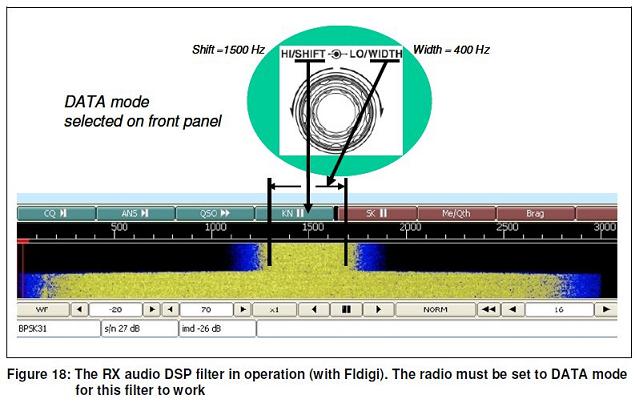
RX Data Audio Filter: When the TS-590S is set to DATA mode, the concentric HI/SHIFT and
LO/WIDTH controls on the front panel let you set up a brick-wall audio DSP filter anywhere in
the audio passband. See Figure 18.
• The HI/SHIFT control sets the center frequency of the filter.
• The LO/WIDTH control sets the width of the filter.
This gives an extremely flexible and effective method of removing unwanted signals.
Bogusław sp7ivo
The Front Panel DATA Button
When you press the DATA button on the front panel to select LSB-DATA or USB-DATA mode,
you can adjust the TX and RX audio filters specifically for data operation. These settings are
independent of those you would normally use for SSB voice operation.
TX Data Audio Filter: Menus 27 and 28 let you select the lower and upper audio cut-off
frequencies of the transmitted signal.
RX Data Audio Filter: When the TS-590S is set to DATA mode, the concentric HI/SHIFT and
LO/WIDTH controls on the front panel let you set up a brick-wall audio DSP filter anywhere in
the audio passband. See Figure 18.
• The HI/SHIFT control sets the center frequency of the filter.
• The LO/WIDTH control sets the width of the filter.
This gives an extremely flexible and effective method of removing unwanted signals.
Bogusław sp7ivo